A good scope can cost as much as the rifle under it, and it doesn't stay under the same rifle forever. Move it, and the zero you wrote on a piece of tape is for a different gun. Magazines are worse: ten PMAGs in a can, a few more in a range bag, and no clear count of what fits what. Everything in this guide is from a real account: a Schmidt & Bender PM II on a Tikka T3x TAC A1, a box of ten Magpul PMAGs for a Daniel Defense DDM4 V7, and a few lights, bipods and parts.
1. Your accessories, and the three ways they attach
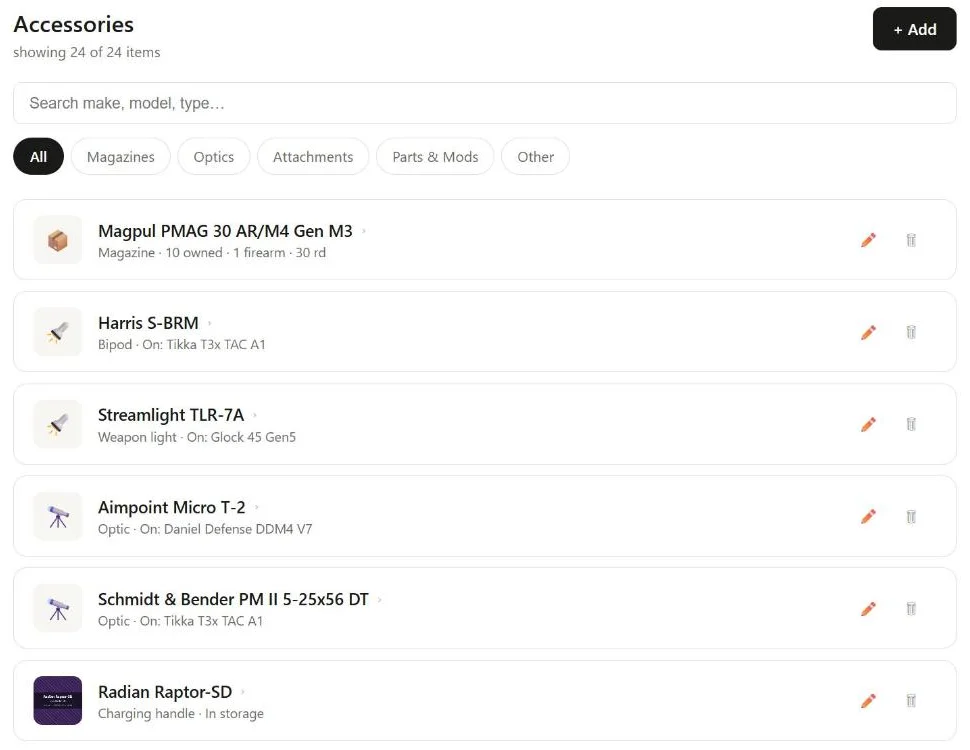
Open Accessories. The list has tabs for All, Magazines, Optics, Attachments, Parts & Mods and Other, and a search box for make, model or type. Each row says where the item is.
Not every accessory belongs to a gun in the same way, so GunCollector treats them three ways, depending on the type:
- Mounted: on one gun at a time, and easy to move. Optics, bipods, foregrips, suppressors, lights, lasers, muzzle devices, holsters and slings. The row reads On: Tikka T3x TAC A1 or In storage.
- Installed: a part that becomes part of the gun. Stocks, handguards, grips, triggers, barrels, bolt carrier groups, buffers, charging handles, safeties and mag releases. It has to come off one gun before it goes on another.
- Works with: one entry for a stack of identical items that fit several guns, with a quantity. Magazines and cleaning kits. The PMAG row reads 10 owned · 1 firearm · 30 rd.
2. Add an accessory
Click + Add, then either Take or Upload Photo or Enter manually. With a photo, GunCollector reads it and fills in the Add accessory form: the category, make, model, variant and whatever specs it can make out. Usually the banner says Filled in from your photo, with a confidence figure. Either way, review it before you save.
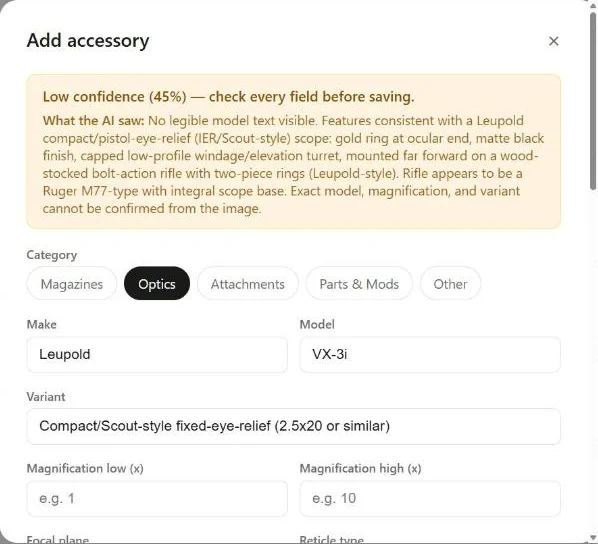
This one is worth a look. The photo showed a scope on a rifle with no readable markings, so the form says Low confidence (45%) — check every field before saving. and What the AI saw explains why: it's working from the shape and finish, not the name on the tube. Leupold and VX-3i are a best guess. Fix what's wrong and fill in what's missing. For a better read, photograph the markings: the model and magnification on an optic, the maker's name on a magazine.
The form also asks where the item is now. Currently assigned to (optional) for a mounted item, or Currently installed on (optional) for a part, starts as Not yet assigned. There are value fields too (purchase price, estimated value and Valuation basis), so your optics count toward your collection's value. Add a photo of the receipt alongside the item photo if you have one.
3. Fill in the optic details
An optic has its own section: magnification low and high, focal plane, reticle type, tube size, turret adjustment, turret click value, objective diameter and, for a red dot, the dot size. Here's the S&B:
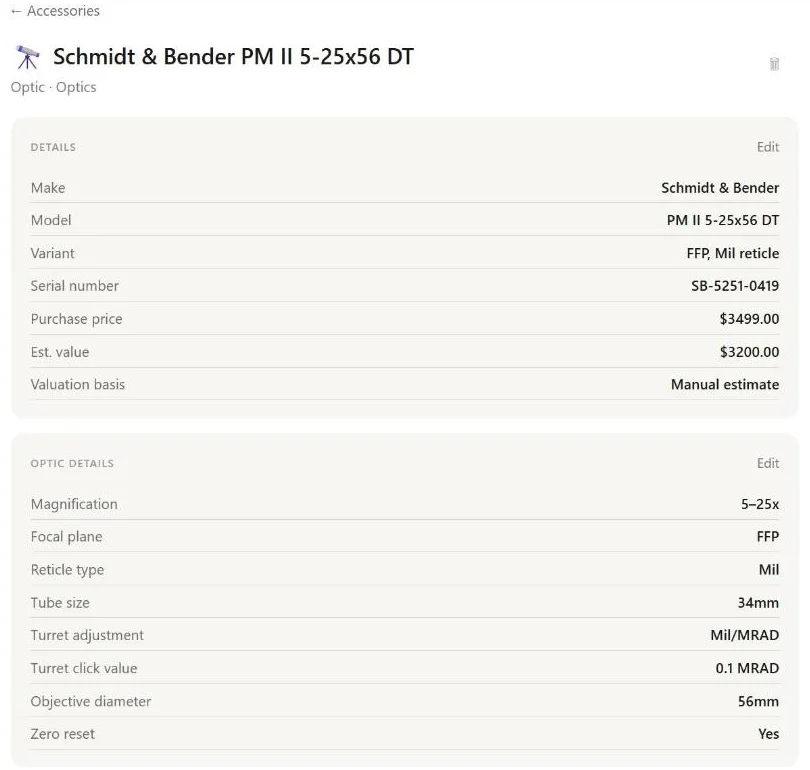
Fill in the turret click value. It's the one optic field that changes what you see elsewhere. With 0.1 MRAD on file, a DOPE card for the rifle this scope is on can show your dial-ups in clicks. Without it, the DOPE can only be shown in MOA or mils.
4. Mount it, move it, and record the zero
Open a mounted-type accessory that's in storage and it says In storage — not currently mounted. Pick the gun from Select firearm… and click Mount. For an optic, two more fields appear: Zero distance (yards) and Zero date. Fill them in if you've zeroed it on this gun.
Once it's on, the page shows Currently mounted on, the gun and the date:
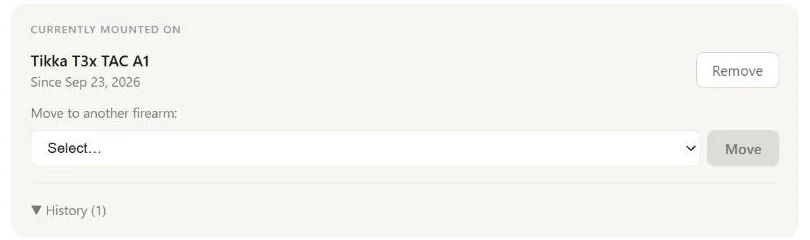
- Move to another firearm: pick the gun and click Move. It comes off the old gun and goes on the new one in one step.
- Remove takes it off and puts it back in storage.
- History lists every gun it's been on, with the dates, and the zero if you recorded one, like Zeroed at 100 yd and the date.
On the web, the zero is entered when you mount from storage. Move doesn't ask for one. If you move a scope to another rifle and want to record its new zero, click Remove and then mount it on the new gun from storage, which asks for the zero distance and date. On your phone, moving asks for the zero too.
5. Install parts
Parts work the same way with different words. Open the Radian charging handle that's in storage, pick the gun under Install on firearm and click Install. The page then shows Installed on, the gun, Installed with the date, and an Uninstall button.
One rule: a part can only be installed on one gun. If it's already on one, installing it on another is refused, so click Uninstall first. That keeps your records honest about which upper has the good trigger.
6. Link magazines to the guns they fit
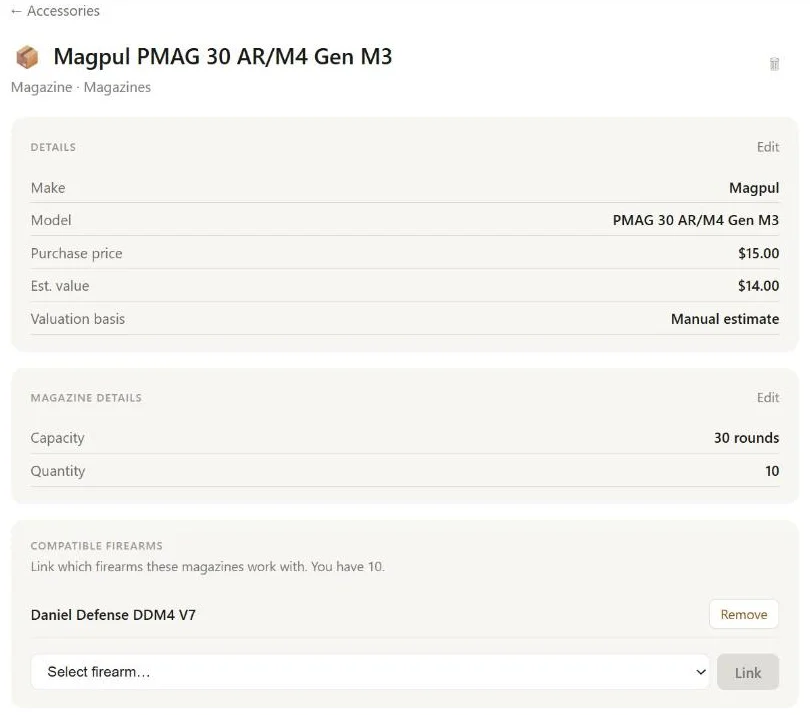
A magazine entry is a stack of identical mags, not one mag. When you add it, fill in Capacity (rounds) * and Quantity you own *, plus the material, condition, generation, floorplate and caliber if you care to.
Then open it and tell GunCollector which guns those mags work with. Under Compatible firearms, pick a gun from Select firearm… and click Link. Link as many as fit: one set of PMAGs can work with every AR you own. Remove unlinks one.
7. See it all on the firearm, and on trip day
Open any firearm and click its Accessories tab. It lists what's Mounted, what's Installed and the Compatible magazines, with a count on each. That's the whole rifle as it sits in the safe, not just the receiver you bought.
It pays off when you plan a range trip. Add a gun to the plan, and GunCollector checks its accessories:
- If an optic on it has no zero on record: No zero date recorded for the Schmidt & Bender PM II 5-25x56 DT on the Tikka T3x TAC A1.
- If the optic was mounted after its last zero: hasn't been zeroed since it was mounted. That's the scope you moved last month and forgot about.
- If no magazines are linked to the gun: No magazines linked to the Daniel Defense DDM4 V7 — link them so they show on the pack list.
The pack list adds the gun's mounted accessories and its linked magazines with how many you own, so the bipod and the mags make it into the truck along with the rifle.
Moving a scope at the range? Your accessories are in the GunCollector app for iPhone and Android too, under More → Accessories, and moving an optic there asks for the new zero. Track Optics, Magazines and Accessories on Your Phone shows it.