NFA paperwork has a way of ending up in three places: the stamp in a safe, a PDF in a downloads folder, and the approval date in your memory. When you're waiting on a Form 4, you want to know how long it's been. When a stamp is approved, you want the record and the copy together, next to the firearm it belongs to. Everything in this guide is from a real account with five NFA items, including a Serbu Super Shorty AOW, a Spikes Tactical 37mm launcher held in a trust, and a registered DIAS.
GunCollector is a record-keeping tool, not legal advice. It stores what you enter and what it reads from your paperwork. It doesn't tell you what's legal, what form you need or how to transfer an item. For the rules, go to the ATF.
1. The NFA items page
Open NFA items. Each card shows the item's status, its type, form and ownership (with the trust or corporation name), the serial number and the dates you've recorded. Search by make, model or type, filter with the type chips, and sort by Name, Date or Status.
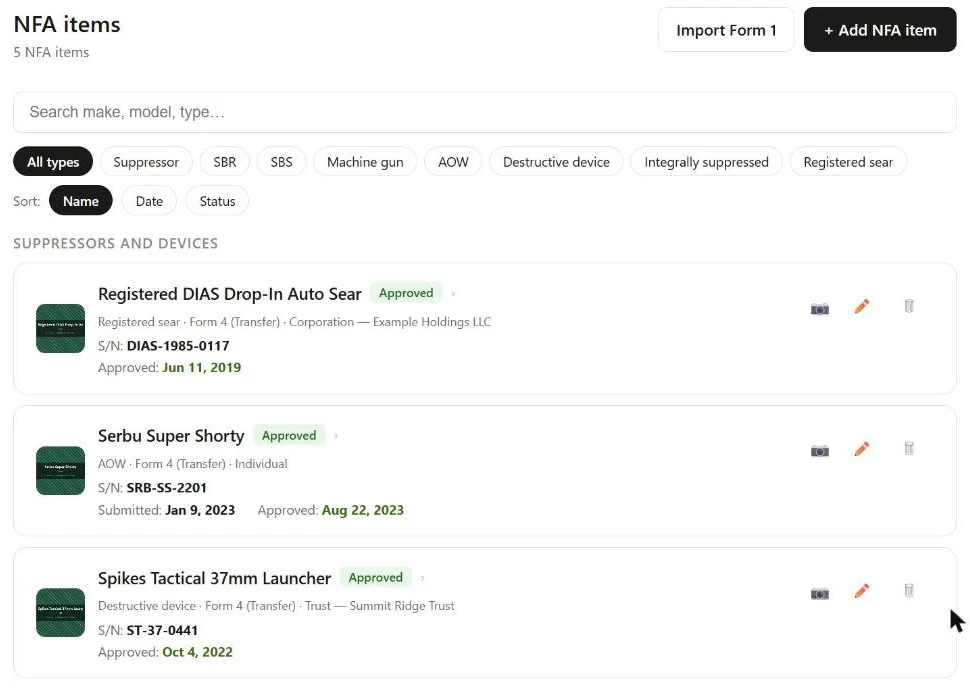
The list is split in two: Suppressors and devices, and NFA firearms. On each card, the camera icon opens its photos and the pencil edits it.
2. Add an item: devices and NFA firearms
Click + Add NFA item. You can start from a photo (Take or Upload Photo, covered below) or click Enter manually. Either way you land on the form, which starts with the NFA type. There are eight:
- Suppressor, AOW, Destructive device and Registered sear are devices. They stand on their own, with their own make, model and serial. You can optionally link a Host firearm, the gun it usually lives on. For a sear, the form reminds you that the sear itself is the machine gun under ATF rules, not the host firearm.
- SBR, SBS, Machine gun and Integrally suppressed are NFA firearms. Each one is tied to a firearm in your collection.
Suppressors and integrally suppressed firearms also get a Caliber.
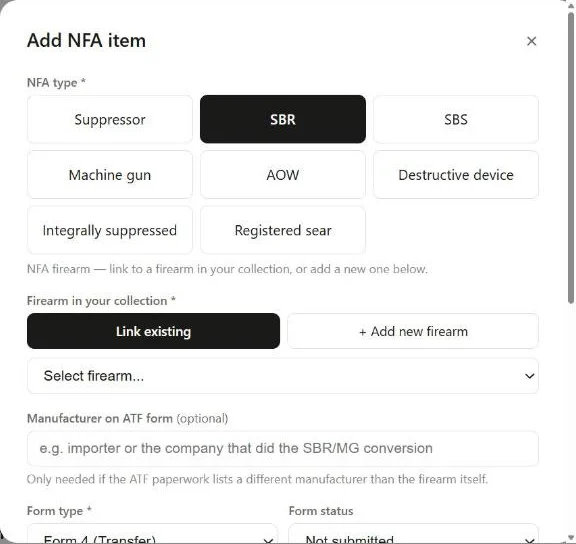
For an NFA firearm, choose Link existing to pick a firearm you've already added, or + Add new firearm to create it in the same step. For an SBR, SBS or machine gun, the make, model and serial number come from that firearm, so you don't keep them in two places. An integrally suppressed firearm keeps its own make, model and serial for the suppressor. A firearm can have only one NFA item, and if you delete the NFA item later, the firearm stays in your collection. A firearm you create here counts toward the Free plan's 5 firearms.
If the ATF paperwork lists a different maker from the one on the firearm (an importer, or whoever did the SBR or machine gun conversion), put it in Manufacturer on ATF form (optional). Leave it blank otherwise.
3. Record the paperwork
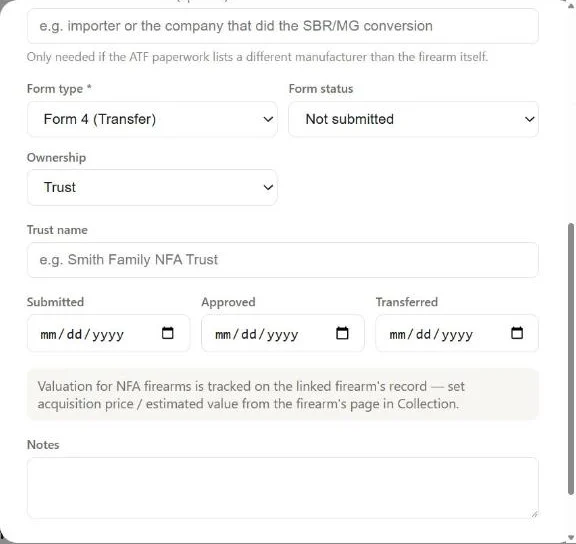
The rest of the form is the paperwork, as it appears on your approved form or as it stands today:
- Form type: Form 4 (Transfer), the default, or Form 1 (Manufacture) for something you made.
- Form status: Not submitted, Submitted, Pending, Approved or Denied. Update it as the form moves along.
- Ownership: Individual, Trust or Corporation. Pick a trust or corporation and a field appears for its name, which then shows on the item's card.
- Submitted, Approved and Transferred dates. Fill in what you have; the rest can wait.
For a device, there's a valuation section for what you paid and what it's worth. For an NFA firearm, the value lives on the linked firearm's record, as the dialog notes: set the price and estimated value on the firearm's page in your collection. Add anything else in Notes, then click Add NFA item.
4. The item's record and the wait
Click an item to open its record. It has the registration details, the valuation for a device, and a form timeline that fills in as each date is recorded.
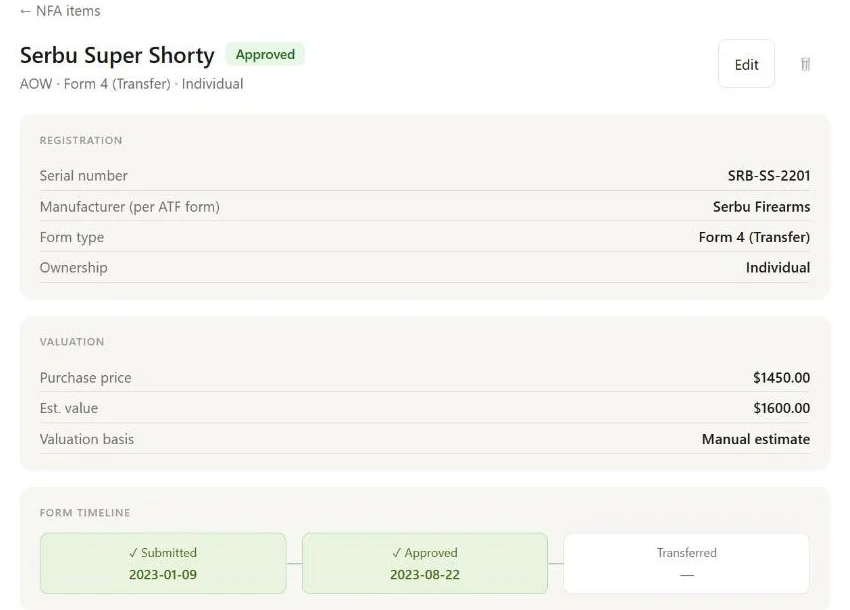
While a form is still waiting for approval, the top of the record counts the days for you: ⏳ N days since submission — still waiting for approval. No more digging for the date you hit submit.
For an NFA firearm, the record also links to the firearm itself with View firearm in collection, and its gallery shows the firearm's photos first.
5. Keep a copy of the tax stamp
At the bottom of the record is Photos & Documents. Pick a category, click + Add photo, and drag to reorder. The categories are Item photos, Serial number, Paperwork / tax stamp and Receipt. NFA items take PDFs as well as photos, so the approved form you downloaded can go straight in.
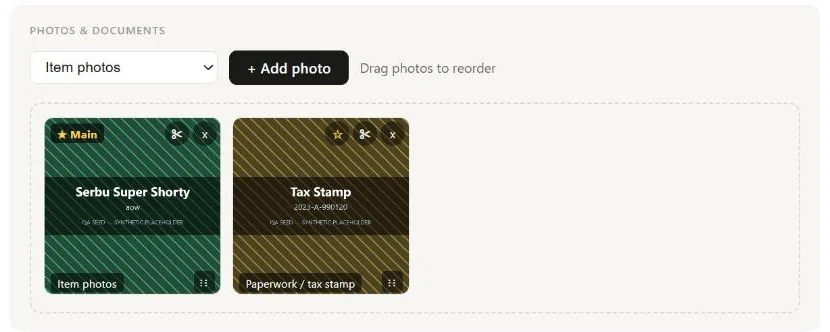
A Receipt does more than sit there: the price on it fills in the item's value. For an SBR or other NFA firearm, that value goes to the linked firearm.
6. Add an item from a photo
In the add dialog, click Take or Upload Photo and give it a photo of the item or of its paperwork. While it reads, you'll see Identifying NFA item…, then the form opens with what it found filled in. Check every field before you save: it's reading a picture, and you know your item better than it does.
A photo of paperwork isn't thrown away once it's read. It's filed on the new item under Paperwork / tax stamp, so your copy is already in place.
7. Import a Form 1 from ATF eForms
Built it yourself? If your Form 1 went through eForms, you don't need to type it in. Click Import Form 1 on the NFA items page, download your approved Form 1 from eforms.atf.gov, and drop the PDF in.
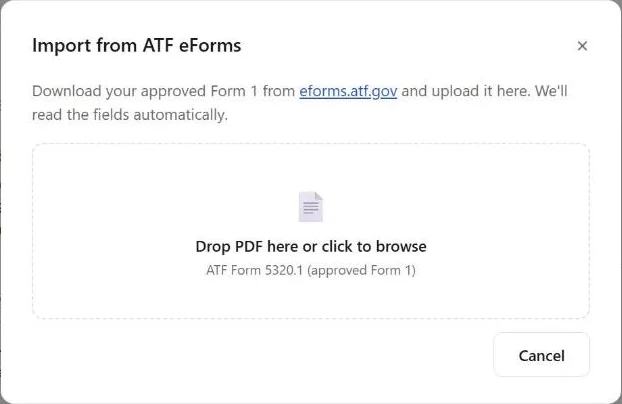
It takes the approved Form 1 (ATF Form 5320.1) as a PDF of up to 10 MB. You'll see Reading your Form 1…, then a review of what it read: the barrel length, overall length, ATF control number and dates, and the firearm record. If anything looks off, it's flagged with a Heads up: note. Read those, fix what needs fixing, and save.
Got the stamp in your hand right now? The GunCollector app for iPhone and Android can add an NFA item from a photo of the item, its Form 1 or Form 4, or the tax stamp. Track NFA Items on Your Phone shows how.