Many homeowner's policies cover guns only up to a set limit, and after a fire or a theft the adjuster wants a list: what you had, what it was worth, and what proves it. Most owners find out how thin their records are at the worst possible moment. GunCollector keeps the value, the basis for that value and the proof next to each item, then turns it into one PDF. Everything in this guide is from a real account: 43 items worth $66,733 in total, including a Tikka T3x rifle.
1. Record values and the valuation basis
Open a firearm and edit it. The Acquisition section holds everything the report draws on: Date acquired, Purchase price ($), Est. value ($), Valuation basis, Value last confirmed and Purchase location.
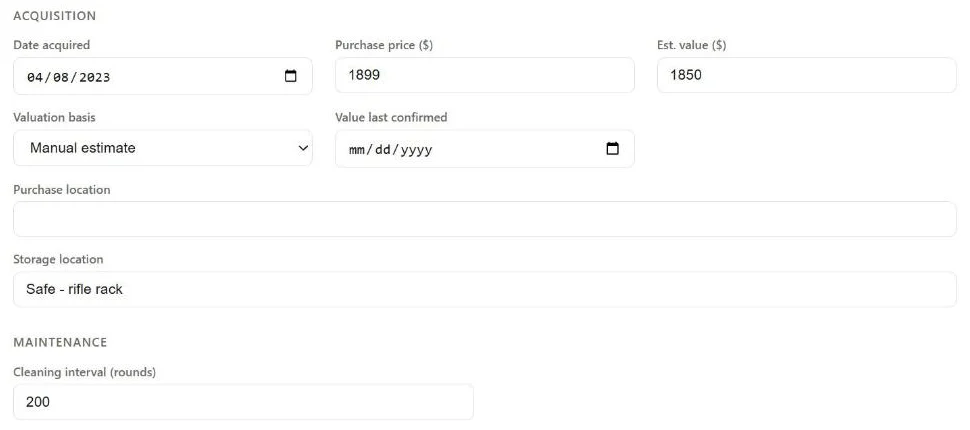
Purchase price is what you paid. Est. value is what you think it's worth now, and it's the number the totals and the report use. Here the Tikka cost $1,899 in 2023 and is estimated at $1,850 now.
Valuation basis says where the number came from. The choices are:
- Receipt on file
- Professional appraisal
- Market estimate
- AI estimate
- Manual estimate
If you added the gun from a photo, the value it came with is marked AI estimate. Change it when you have something better. Value last confirmed is the date you last checked the number. Leave it blank and the item counts as due for revaluation.
NFA items and accessories have the same Valuation basis and Value last confirmed fields, so a suppressor or a $2,000 scope gets the same treatment as a rifle.
2. Add proof with a receipt photo
An item has proof on file when it has a photo with the role Receipt, or when its basis is Professional appraisal. Everything else is your word for it, and the report says so.
Upload a photo of the receipt to the item and give it the role Receipt, or change the role of a receipt photo you already uploaded. GunCollector reads it and fills in what it finds. For a firearm that's the purchase price, the date, where you bought it, the estimated value, and a basis of Receipt on file. A banner lists what changed: ✓ Auto-filled from photo: followed by the fields.
- Only blank fields fill in. A value you typed, or one marked Professional appraisal, stays as it is. The exception is a value marked AI estimate: a receipt replaces it.
- Value last confirmed is set to the date on the receipt.
- NFA items work the same way, except for the purchase location, and the receipt can be a PDF. For an SBR, the value goes to the linked firearm.
- Accessories take the unit price times the quantity. Ammo takes the price per round, the date and the place. Both show ✓ Filled from receipt: with the fields.
- If the photo isn't a receipt, isn't in US dollars, or is for a different item, nothing is filled in.
Got an appraisal letter instead? Set the basis to Professional appraisal and enter the appraised value and date.
3. See what needs attention
The Collection valuation tile on the dashboard totals each category and flags what's weak.

- No proof on file: no Receipt photo and no professional appraisal.
- Due for revaluation: no Value last confirmed date, or one more than 2 years old. NFA items are due after 1 year.
- Above your appraisal threshold: items valuable enough that an insurer is likely to want a professional appraisal. You set that number in the next step.
This account has work to do: 29 of its 43 items have no proof, and the NFA items alone are over $40,000.
4. Set your thresholds
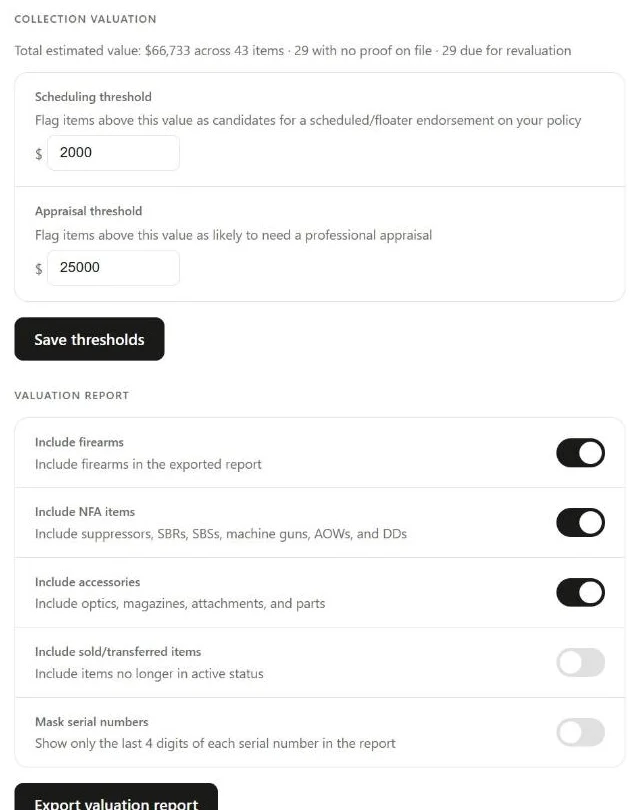
Go to Settings. Under Collection Valuation, a summary line repeats the totals, and two numbers decide what gets flagged:
- Scheduling threshold (default $2,000): items above it are candidates for a scheduled or floater endorsement on your policy, which covers a named item for its own value instead of under the general limit. Ask your agent what their cutoff is and use that.
- Appraisal threshold (default $25,000): items above it are likely to need a professional appraisal.
Click Save thresholds when you change either one.
5. Export the report
Below the thresholds, Valuation Report sets what goes in:
- Include firearms, Include NFA items and Include accessories are on by default.
- Include sold/transferred items is off by default. Turn it on if you need a record of items you no longer have.
- Mask serial numbers shows only the last 4 digits of each serial number. Useful if the PDF will be emailed around.
Click Export valuation report here or on the dashboard tile. The button reads Generating… (can take a few minutes for a large collection), then collection_valuation_report.pdf downloads. The report is a PDF only.
What's in the PDF
- Collection Valuation Report, with who it's prepared for.
- Summary: the total, and the total for each category.
- Items Needing Attention.
- Sections for Firearms, NFA Items and Accessories. Each row has a photo, the item with its serial number (or No serial) and caliber, the date acquired, purchase price, estimated value, valuation basis, when it was last updated, and proof.
- Badges on each row: Proof on file, No proof on file or Needs revaluation.
Before you send it
- Work down the dashboard counts first. Every item with No proof on file or Needs revaluation shows up that way in the PDF, and an agent will ask about it.
- Check the Est. value of anything still marked AI estimate. It was a starting point, not a price you checked.
- Turn on Mask serial numbers if the PDF is going by email, and keep an unmasked copy for yourself.
NFA firearms such as an SBR are listed once, under Firearms on the linked firearm, so nothing is counted twice. Ammo isn't in the report.
This is your own inventory, not an appraisal. The report says so at the bottom: the values are self-reported, and it doesn't replace a professional appraisal where your insurer requires one. For anything above your appraisal threshold, get one and record it with the basis Professional appraisal.
For what an insurer typically asks for and how to photograph and store your records, see How to Inventory Your Firearms for Insurance.
The valuation report is a web-app feature. On the GunCollector phone app you can see each item's estimated value and basis, edit them, set your thresholds in Settings → Preferences, and add Receipt photos that fill in the purchase details. The app also tells you how many valued items have no proof of value on file. Make the PDF report on the web.